B2B SAAS · FOOD TECH
ZipLunch Restaurant Portal
Designing the operational backbone that lets ZipLunch scale and pushing back when the client's vision conflicted with user needs.
TOOLS
Figma, Adobe Illustrator
ROLE
Design Lead
DURATION
6 months
PLATFORM
Web (Desktop)

OVERVIEW
The bottleneck blocking growth
ZipLunch connects commercial building tenants with local restaurants, offering delivery at takeout prices. The product works but the operations behind it don't scale. Every time a customer places an order, ZipLunch staff manually relay it to the restaurant. There's no automation, no self-service, and no path to expansion without proportionally growing the operations team.
The solution: a restaurant admin portal that gives restaurant owners full control over their menus, schedules, and order fulfillment — and gives ZipLunch the automation layer they need to grow. This wasn't a redesign project. It was a 0→1 product.
"Currently, ZipLunch is manually placing orders with the restaurants after receiving them from their customers and that is not scalable."
— ZipLunch product brief
MY ROLE
Design lead on a 0→1 product
I served as Design Lead on this project, guiding a team through the full Stanford design thinking process, from initial research through final usability testing and client handoff. I led user research, facilitated team ideation, designed the core order management flow, and provided the design framework the entire portal was built on.
Beyond the design work itself, I played an active role in managing the client relationship, including a critical moment late in the project where I had to push back on the client's direction to protect the integrity of the user experience.
RESEARCH
Understanding the market and the user
Competitive analysis
I evaluated four competitors; Uber Eats, Ritual, Peachd, and LunchOn, specifically through the lens of restaurant operator tooling. The finding was clear: the market had optimized almost exclusively for the diner experience. Restaurant-side admin tools were underbuilt, inconsistently designed, and poorly matched to the operational realities of running a kitchen.
[ Competitive analysis matrix ]
ZipLunch vs. Uber Eats, Ritual, Peachd, LunchOn — restaurant operator feature comparison

Industry context
$93B
Found the CRN preview helpful
16%
Of global food orders placed from the workplace
User interviews — and what happened when ZipLunch's recruits didn't show
ZipLunch provided 11 restaurant owners to interview. One showed up. Rather than accepting this as a limitation, I treated it as a research design problem, built a contingency plan, sourced my own participants, and completed 6 substantive interviews.
[ Affinity diagram ]
Miro board synthesizing 6 restaurant owner interviews into key themes
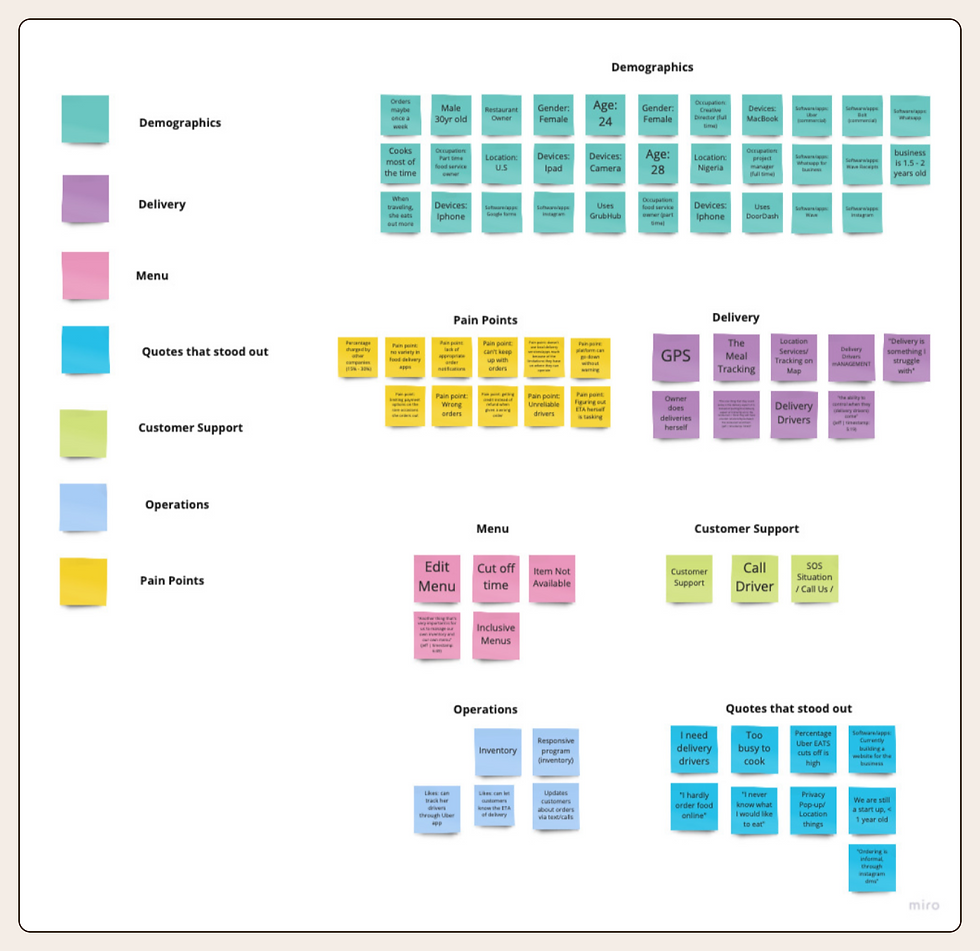
Three themes dominated the interviews:
Technology as growth lever — Restaurant owners weren't looking for basic order management. They saw new platforms as opportunities to reach more customers and look more competitive.
Delivery ownership is the pain point — Multiple owners flagged the delivery relationship as the biggest friction in third-party partnerships. When delivery fails, the restaurant's brand suffers, even if they had nothing to do with it.
Menu autonomy is non-negotiable — Every owner wanted full, immediate control of their menu. Any system that lagged behind real-world changes was a dealbreaker.
DEFINE
Principles before pixels
Before ideating, I established four design principles to govern every decision. These aren't aspirations, they're decision-making tools for when trade-offs come up.
Organized
All data in one place. No multi-tab workflows to see a complete picture of operations.

Reliable
Consistency is a form of trust. An interface that behaves predictably earns confidence from time-pressured operators.
Simple
Usable in the middle of a lunch rush — not just by someone with time to learn software.
Convenient
Every workflow optimized to reduce steps. Time is the scarcest resource in a restaurant.
PROBLEM STATEMENT
"The restaurant owner wants a clean, simple, and portable administrative tool with a supportive onboarding process that allows them to manage their menu, schedule and order process so that they are better able to reach a larger market, efficiently meet customer needs, and maintain productivity."
IDEATE
From sketches to structure
I led the team through a 6-8-5 divergent sketching exercise, with each team member owning a specific functional area. I was responsible for the order management flow and the home dashboard i.e the two sections most critical to ZipLunch's automation goal.
[ Initial sketches + site map ]
6-8-5 divergent sketches for dashboard and order management, plus the final portal information architecture

Home
Orders
New Order
In progress
Out for Delivery
An important early decision: my initial dashboard concept organized data by individual dish. After reviewing with both the team and ZipLunch, we aligned on a single consolidated summary view. The principle of "Organized" won out, operators need a snapshot, not a drill-down as their starting point.
MID-FIDELITY
Menu management
Restaurant owners can create, edit, and delete menu items, with a dual-entry option: manual input or direct PDF upload. This came directly from research, many owners already had menus as PDFs and would abandon a tool that forced them to re-enter everything by hand.
[ Menu management ]
Item list view, add/edit item modal, PDF upload flow

Order management
Restaurants can view, confirm, delay, and cancel incoming orders and search by order number. This flow would become the most contested part of the project.
[ Order management ]
Active orders list, order detail view, confirm/delay/cancel status update flow

Designing the four core flows
Onboarding
First-time setup walks restaurant owners through account creation, restaurant details, menu upload, and operating hours, ending with a live tutorial of the portal. The goal: get a new restaurant operational in a single session, without needing support.

My designs were selected as the structural framework for the portal. I maintained ownership of the order management flow while contributing the foundation for all four sections.
Schedule management
The schedule section gives restaurant owners control over operating hours, holiday and special event hours, and per-item menu availability windows. A calendar view provides an at-a-glance summary of the restaurant's schedule, particularly useful for owners managing complex or frequently changing hours.
[ Schedule management — weekly hours + calendar view ]

TESTING
Results — and one score that mattered most
9 participants tested the mid-fidelity prototype over 4 days. All had food industry experience; 4 were currently working in it.
87.5%
Onboarding approval rating
85%
General flow approval rating
82%
Menu process approval rating
75%
Order process approval rating
The 75% on the order flow was the signal that required the most careful interpretation. It wasn't a design failure — it was a misalignment between what ZipLunch wanted and what users expected.
DESIGN ADVOCACY
When the client's vision and user needs diverged
ZipLunch expected restaurant owners to manage delivery status updates. Users expected the opposite: that ZipLunch, as the delivery operator, would own status tracking entirely and keep customers informed automatically.
This isn't a UX problem you can design around. If the restaurant is responsible for delivery status, and users believe ZipLunch is responsible, then every failed update damages the restaurant's reputation even when they did nothing wrong.
"The one thing that they could solve is the delivery aspect — instead of putting that directly on to the restaurant, they will have a better relationship between the restaurant and them."
— Interview participant, restaurant owner
In our final working session, I presented the data directly to the ZipLunch team and proposed three progressive delivery tracking models:
Automated post-delivery confirmation — Once an order leaves the restaurant, a message is automatically sent to the customer. After 30 minutes, an automated check-in asks the customer to confirm delivery.
Driver app integration — Restaurant drivers confirm delivery via a companion app, triggering automated customer notifications.
GPS-triggered confirmation — When the driver is within 50 feet of the delivery hub, GPS automatically confirms delivery and notifies the customer simultaneously.
PRINCIPLE AT WORK
A designer's job isn't to find a way to make a client requirement work. It's to know when a requirement is wrong and to have the data and the clarity to say so.
HANDOFF RECOMMENDATIONS
What we handed off to ZipLunch
Navigation clarity — The top navigation created ambiguity between portal sections. A revised IA would reduce orientation errors for new users.
Help / live chat — A persistent support entry point matching the customer-facing product would reduce abandonment during complex tasks.
Menu schedule placement — Does it belong in the Menu tab, the Schedule tab, or both? This was unresolved at handoff and will affect discoverability.
Featured restaurant notifications — Dashboard callouts for when a restaurant is featured on ZipLunch would increase engagement and transparency.
REFLECTIONS
What I'd take forward
ZipLunch was the project where I most clearly learned what it means to be a designer on a client engagement as opposed to an in-house designer. The client has a vision. Users have needs. Those two things are not always the same. The designer's job is to help the client understand where they diverge and to propose a path that serves both.
The contingency planning I did when ZipLunch's interview recruits didn't show up also shaped how I think about research logistics. A research plan that depends entirely on one source of participants is fragile. Building redundancy into the recruitment process and knowing how to source your own participants when needed is a core research skill, not just a nice-to-have.